Rpeak
This example shows how to use the RpeakData class to make a dataset. This class is similar to the RhythmData class. However, unlike the RhythmData class, it does not provide only one label for each excerpt. Instead, it provides a list of labels for each excerpt. Each element in this annotation list corresponds to a subsegment of the excerpt. The ECGSequence class uses the created dataset to generate batches of sample data.
This example is availble on GitHub.

Install pyheartlib
First, pyheartlib needs to be installed.
try:
    import pyheartlib
    print(f'Pyheartlib version {pyheartlib.__version__} is already installed!')
except ModuleNotFoundError:
    print('Installing pyheartlib...')
    %pip install pyheartlib
    import pyheartlib
    print(f'Pyheartlib version {pyheartlib.__version__} is installed!')
Pyheartlib version 1.21.0 is already installed!
Download raw data
Pyheartlib supports the WFDB format. A popular dataset that uses this format is the “MIT-BIH Arrhythmia Database”. The code below downloads this dataset and stores it in the data directory.
Show code cell content
# Download the raw data and store them in the base data directory
from pathlib import Path
if not Path('data').is_dir():
  print('downloading raw data...')
  import io, zipfile
  from urllib.request import urlopen
  url='https://www.physionet.org/static/published-projects/mitdb/mit-bih-arrhythmia-database-1.0.0.zip'
  with urlopen(url) as rs:
      zipf = zipfile.ZipFile(io.BytesIO(rs.read()))
      zipf.extractall('data/')

  # Create the config file. For this example, it will be download from the original repository
  with urlopen("https://raw.githubusercontent.com/devnums/pyheartlib/main/src/pyheartlib/config.yaml") as file:
      content = file.read().decode()
  with open("data/config.yaml", 'w') as file:
      file.write(content)
Create dataset
To create a dataset using the RpeakData, first it needs to be imported.
from pyheartlib.data_rpeak import RpeakData
The next step is to create an object of the pyheartlib.data_rpeak.RpeakData.
rpeak_data = RpeakData(
    base_path="data", remove_bl=False, lowpass=False, progress_bar=False
)
Descriptions of all the parameters can be found here.
Using the save_dataset() method, the dataset will be created.
rpeak_data.save_dataset(
    rec_list=train_set,
    file_name="train.rpeak",
    win_size=5 * 360,
    stride=360,
    interval=72,
)
Let’s create the dataset by running the next code block.
import numpy as np
import pandas as pd
from pyheartlib.data_rpeak import RpeakData

# Make an instance of the RpeakData
rpeak_data = RpeakData(
    base_path="data", remove_bl=False, lowpass=False, progress_bar=False
)

# Define records
train_set = [201, 203]

# Create the dataset
# The win_size specifies the length of the excerpts
rpeak_data.save_dataset(
    rec_list=train_set,
    file_name="train.rpeak",
    win_size=5 * 360,
    stride=360,
    interval=72,
)
File saved at: data/train.rpeak
Now that the dataset is ready, it can be loaded using the load_dataset() function.
from pyheartlib.data_rpeak import load_dataset
annotated_records, samples_info = load_dataset("data/train.rpeak")
Let’s load the data and count the number of samples for each class.
# Load the dataset
from pyheartlib.data_rpeak import load_dataset
annotated_records, samples_info = load_dataset("data/train.rpeak")

labels = []
for sample in samples_info:
    labels.append(sample[3])
df = pd.DataFrame(np.unique(labels, return_counts=True), index=["Label", "Count"])
print(df)
File loaded from: data/train.rpeak
           0    1   2  3      4   5     6    7   8
Label      0    A   F  J      N   Q     V    a   j
Count  65388  150  15  5  20718  20  3210  494  50
The metadata of a sample is a list: [record ID, onset, offset, annotation]
# Metadata of a sample excerpt
# [record ID, onset, offset, annotation]
print(samples_info[102])
[0, 36720, 38520, [0, 0, 0, 0, 'N', 0, 'N', 0, 'N', 0, 0, 0, 'N', 0, 0, 'N', 0, 0, 'N', 0, 0, 0, 'N', 0, 0]]
Generate data samples
In this section, the dataset that was created in the previous section will be used to generate batches of sample data. To accomplish this, an instance of pyheartlib.data_rpeak.ECGSequence must be created.
from pyheartlib.data_rpeak import ECGSequence

ecgseq = ECGSequence(
    annotated_records, samples_info, binary=False, batch_size=2, raw=True, interval=72
)
The ECGSequence takes the annotated_records (ECG records) and the samples_info (metadata) that were loaded previously.
Other parameters that ECGSequence takes can be found here.
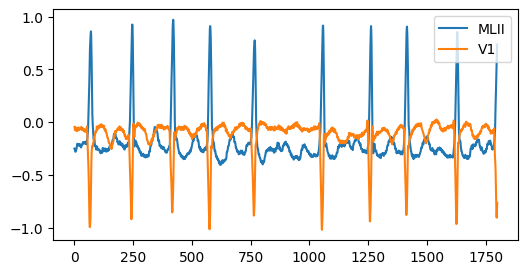
Let’s generate a batch of data and examine the shapes and values of the samples.
# Generate data in batch using he ECGSequence

# Returns a tuple containing two elements when its object is utilized in
# this way: ECGSequence_object[BatchNo].

# The first element (Batch_x) contains data samples and the
# second one (Batch_y) their associated annotation.

# Batch_x contains the signal excerpts or their features (Batch_wave).

# If `raw` is False, Batch_wave has the shape of
# (Batch size, Number of channels, Number of sub-segments, Number of features),
# otherwise, it has the shape of (Batch_size, Number of channels, Length of excerpt).

# Batch_y has the shape of (Batch size, Length of annotation list).

from pyheartlib.data_rpeak import ECGSequence

ecgseq = ECGSequence(
    annotated_records, samples_info, binary=False, batch_size=3, raw=True, interval=72
)
bt = 0  # Batch number
batch_x, batch_y = ecgseq[bt]
batch_annotation = batch_y  # Annotation
batch_wave = batch_x  # Excerpt

print("Length of annotation for each sample data:", len(batch_annotation[0]))
print("Length of each sample excerpt:", batch_wave.shape[2])
print("Batch_wave shape:", batch_wave.shape, ", Batch_annotation shape:", batch_annotation.shape)
Length of annotation for each sample data: 25
Length of each sample excerpt: 1800
Batch_wave shape: (3, 2, 1800) , Batch_annotation shape: (3, 25)
# Annotations of the samples in the batch
print(batch_annotation)
[['N' '0' '0' 'N' '0' 'N' '0' '0' 'N' '0' 'N' '0' '0' '0' 'N' '0' '0' 'N'
  '0' 'N' '0' '0' 'N' '0' 'N']
 ['0' 'V' '0' '0' 'N' '0' '0' '0' 'N' '0' '0' 'N' '0' 'N' '0' '0' 'N' '0'
  'V' '0' '0' 'N' '0' '0' '0']
 ['0' '0' 'N' '0' '0' '0' '0' 'N' '0' '0' '0' '0' '0' 'N' '0' '0' '0' '0'
  '0' 'N' '0' '0' '0' '0' '0']]
# Plot an output excerpt of the batch
wf = batch_wave[0]
wf_ch1 = wf[0]
wf_ch2 = wf[1]
print(f'Length of each excerpt: {len(wf_ch1)}')

import matplotlib.pyplot as plt
plt.figure(figsize=(6, 3))
plt.plot(wf_ch1);
plt.plot(wf_ch2);
chs = rpeak_data.config["CHANNEL"]
plt.legend([chs[0], chs[1]], loc="upper right");
Length of each excerpt: 1800
The code below generates a batch with the raw parameter set to False. In this case, the generated batch contains computed features instead of raw waveform.
# When raw is set to False
ecgseq = ECGSequence(
    annotated_records, samples_info, binary=False, batch_size=3, raw=False, interval=72
)

bt = 0  # Batch number
batch_x, batch_y = ecgseq[bt]
batch_annotation = batch_y  # Annotation
batch_wave = batch_x  # Excerpt

print("Length of annotation for each sample data:", len(batch_annotation[0]))
print("Batch_wave shape:", batch_wave.shape, ", Batch_annotation shape:", batch_annotation.shape)
Length of annotation for each sample data: 25
Batch_wave shape: (3, 2, 25, 14) , Batch_annotation shape: (3, 25)